
AI Image Prompts That Actually Work: Structure and Examples
A short prompt like "a cozy coffee shop" gets you something like the average of every coffee shop the model has seen: centered, evenly lit, and forgettable. What helps is a fixed structure that answers the questions the model would otherwise answer for you: what the subject is, where it is, what it looks like, how it's lit, and where the camera stands. It won't make every run a hit, but it cuts down how much the model has to guess.
If you'd rather start from a working base and edit it, take one of the ready-made AI image prompts and run it through the checks in this article.
Why most image prompts fail: vague subject, no light, no framing
When a prompt leaves something out, the model fills the gap with a default. The defaults are predictable:
- Vague subject. "A woman" becomes a generic stock face. "A woman in her 60s with silver braids and a paint-stained apron" becomes a person.
- No light. You get flat, frontal, shadowless light, and that's what makes images look synthetic.
- No framing. The subject sits dead center in an eye-level medium shot, every time.
A quick test: read your prompt and ask whether two photographers could shoot it in completely different ways. If they could, it's underspecified, and you'll get random results.
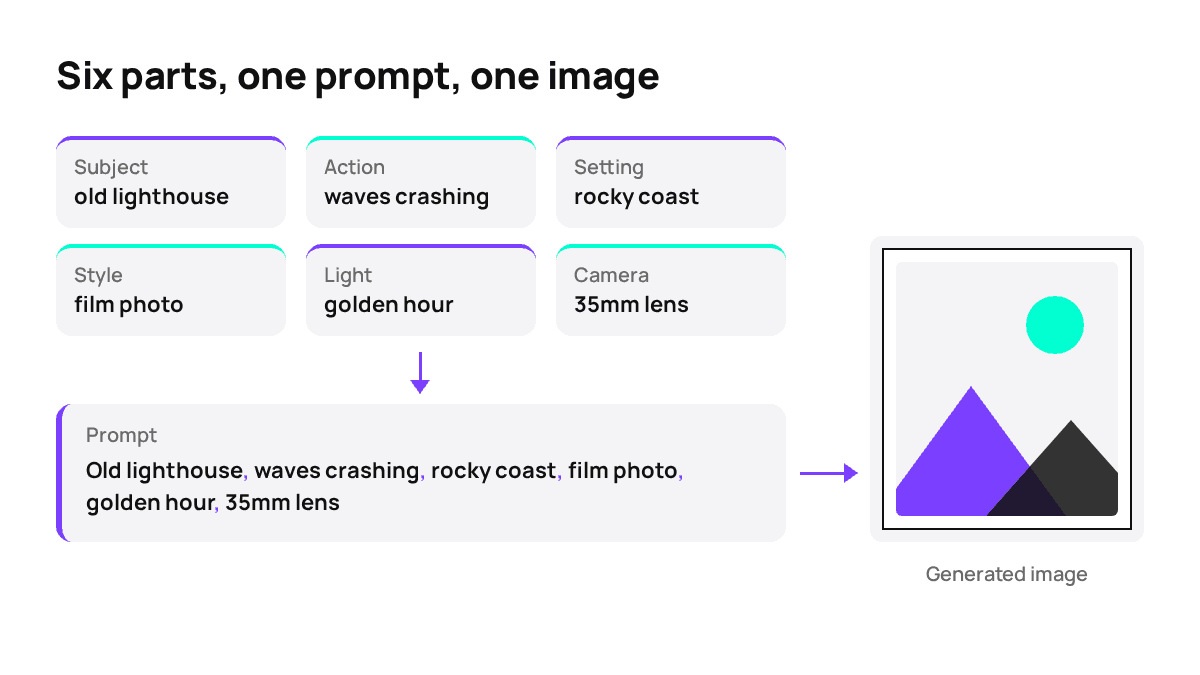
A prompt structure that works: subject, action, setting, style, light, camera
Write the six parts in this order. Many models weigh the start of a prompt more heavily, so the subject goes first.
Subject: who or what, plus 1-2 defining details
Action: what it is doing, or its state
Setting: where, what surrounds it, time of day
Style: photo / illustration / 3D render, mood, color palette
Light: direction, quality (hard/soft), color temperature
Camera: shot size, angle, lens, depth of fieldFilled in:
An old fisherman with a weathered face and a yellow raincoat,
mending a net, on a wooden pier in a grey harbor at dusk,
documentary photo, muted blue and orange palette,
low warm light from a lamp on the right, close-up at eye level,
85mm lens, shallow depth of fieldEvery fragment should change something visible. If you can delete a word and the picture wouldn't change, delete it. The model won't follow every fragment on every run, though, so expect some parts to be ignored now and then.
Midjourney prompt structure: what's different and what carries over
The description carries over to other models unchanged: subject, setting, style, light and camera mean the same thing everywhere. Two things are different in Midjourney:
- Phrasing. Midjourney handles short, dense phrases and style references well. "Moody cinematic still, teal and amber" works there. Nano Banana and GPT Image tend to follow full sentences better.
- Parameters. Flags like --ar 16:9, --stylize or --no are Midjourney syntax. Other models either ignore them or read them as part of the description. Through third-party interfaces, the parameters may also be handled differently from Midjourney's own app. Check the aspect ratio of your first result before you trust them.
The same idea written both ways:
Midjourney: lighthouse on a cliff, storm, cinematic, teal and amber, wide shot --ar 16:9
Sentences: A lighthouse on a rocky cliff during a storm, cinematic look with a teal
and amber palette, wide shot from the sea, waves breaking below.Image prompt examples: weak vs strong, side by side
Three pairs. Each strong version fills in the parts the weak one left out.
Photo
Weak: a city street at night
Strong: Narrow Tokyo side street at night after rain, neon signs reflecting
in puddles, a lone cyclist passing, street photo, cool blue and pink
tones, low angle, 35mm lensPoster
Weak: jazz festival poster
Strong: Poster for a jazz festival, a saxophone drawn in bold geometric
shapes, deep navy background with gold accents, the title "BLUE NOTE
NIGHTS" in large art deco lettering at the top, flat vector styleProduct
Weak: perfume bottle photo
Strong: Square glass perfume bottle on wet black slate, hard light from
behind making the glass glow, water droplets on the surface, dark
studio background, macro product photo, centered compositionTo check a result, compare it with the prompt one part at a time. If the light came out wrong but everything else is right, rewrite only the light line.
Prompts by task: product shots, portraits, posters with text, illustrations
Product shots
[Product + material] on [surface], [light direction and quality],
[background], [lens], product photo, [palette]The surface and the light do most of the work here. For photorealistic shots, start with an AI photo generator and a photoreal model. Check the edges of the product closely: labels and logos are where models slip most often.
Portraits
[Age, features, clothing], [expression], [setting], [light: e.g. window
light from the left], [shot size: head-and-shoulders], [lens: 85mm]Give the expression in a few words. "Slight smile, looking off-camera" works better than "happy".
Posters with text
Put the exact text in double quotes and keep it to a few words. Also state where it goes: "at the top" or "centered at the bottom". For lettering, pick a model built for typography, such as Ideogram v3 for posters and lettering. Even then, text isn't guaranteed to come out clean, so proofread every letter. A single swapped character means another run.
Illustrations
[Subject and action], [illustration style: flat vector / watercolor /
ink line art], [palette of 2-4 colors], [background], [composition]Name a technique rather than a vague mood. "Risograph print, two colors" sets the style. "Artistic" doesn't.
Matching the prompt to the model: Midjourney, Flux 2 Pro, Ideogram v3, Seedream, Nano Banana
The same prompt costs different amounts and behaves differently on each model. The table uses run prices in credits from the Moleculs catalogue as of October 2026. The full model catalogue has the current numbers.
| Model | Credits per run | Strength | How to write |
|---|---|---|---|
| Midjourney | 23 | Artistic, stylized images | Dense phrases, style words, then check how parameters behave |
| Flux 2 Pro | 10 | Detail, realism | A full description; the six-part structure as is |
| Ideogram v3 | 14 | Typography, posters, stylization | Text in quotes, position stated, short wording |
| Seedream v4.5 | 13 | Photorealism, 1K/2K/4K | Concrete light and lens details |
| Nano Banana 2 | 21 | Text rendering, multi-image editing, 4K | Plain full sentences, like a brief to a designer |
Write sentences for Nano Banana and GPT Image, and keep tighter phrasing for Midjourney. The six parts stay the same in both cases.
Using a reference image instead of describing everything
Some things take a paragraph to describe and still come out wrong: a specific palette, a lighting setup, a character's face. A reference image often gets you closer in one upload, though it won't reproduce them exactly. Midjourney accepts up to 5 input images, Nano Banana Pro up to 14, and Nano Banana Editor is built for image-to-image edits from a reference.
A reference copies more than you asked for, though. Composition and background leak into the result. So state what to take from it:
Use the reference only for the color palette and lighting.
New subject: [your subject]. Ignore the composition of the reference.How to iterate: change one variable at a time
Generation is random, so a single run tells you very little. Here's a process you can repeat:
- Run the base prompt twice. The difference between the two results is your noise level.
- Pick the part that's furthest off, usually light or framing, and rewrite only that line.
- Run it twice again. If the change shows in both results, keep it. If it doesn't, roll it back.
- Keep a short log: prompt version, what changed, verdict.
Budget the experiments. Ten runs cost ten times the per-run price in the table above, so the gap between models adds up quickly. One sensible approach is to find the composition on a cheaper model and then move the finished prompt to the model you need. The result won't carry over one to one, so plan for a couple of runs to adjust. To try the full structure, run the coffee mug prompt from this article and then change one part at a time.
Common mistakes: keyword soup, conflicting styles, negatives that backfire
- Keyword soup. "4k, ultra detailed, masterpiece, trending, best quality" often changes little on newer models, and it pushes your real details further down the prompt. Cut it.
- Conflicting styles. "Watercolor, photorealistic, 3D render" makes the model average the three styles, and you get mush. Pick one style. If you want a mix, give one style the lead: "photo with a subtle painterly grade".
- Negatives that backfire. "No people" mentions people, and some models add them. Describe the scene you want instead: "empty street at dawn".
- Too many subjects. Past two or three main objects, details get swapped between them, like the wrong color on the wrong item. Split the scene, or use a reference.
- Long text in the image. A full sentence on a poster often comes out with errors. Keep it to the title and add the rest in a layout tool.
When a result is off, check the prompt against the six parts first. Usually one of them is missing or contradicts another.
What a good prompt can't fix
A structured prompt narrows the range of results, but it doesn't remove the randomness. Even a well-built prompt can miss on small text, hands, exact counts of objects, or the likeness of a specific person, and no wording guarantees a hit on the first run. For those cases, plan for several runs, or fix the last details in an image editor instead of the prompt. The model strengths in the table are general tendencies, not promises, so test your own subject on a cheap run before you commit to a model.
Frequently asked questions
Related articles
 AI explained
What Is an AI Aggregator and When Do You Actually Need One?
How an AI aggregator gives you text, image, video and audio models in one subscription, what it can't do, and a simple test to see if you need one.
How to Write AI Prompts: the Five-Block Formula
A five-block prompt formula with before-and-after examples, format-specific rules for images, video and audio, and ready-to-copy templates.
How to Animate a Photo with AI: Image-to-Video Step by Step
A practical walkthrough of animating a still photo with image-to-video models: source image requirements, a five-line motion prompt, model choice and how to fix the usual artifacts.
Corporate access to AI models
Invoice for legal entities, centralised payment, priority support
- Access to ChatGPT, Gemini, Grok, Claude and DeepSeek
- Prompt library and shared access inside the team