
Free ChatGPT, Gemini and Grok Alternatives: What Actually Works

You can get a capable AI chatbot for free in three ways: another vendor's free plan, an open-weight model on your own computer, or a multi-model service with a free allowance. Each one handles drafts, summaries and everyday questions. None of them gives you a flagship model with no limits.
If you've hit the cap in ChatGPT, the quickest fix is to move the same task to a second free app. If you want to compare before you pay, send one prompt to several models and judge the answers. You can also use ChatGPT models online alongside Google and xAI models under one account.
Short answer: where to get a capable AI chatbot for free
- Another vendor's free plan. As of October 2026, Claude, Gemini, ChatGPT, DeepSeek, Qwen Chat and Microsoft Copilot all have one. When one runs out, switch to the next.
- A search assistant such as Perplexity, if you need fresh facts with sources.
- An open-weight model on your own machine. There's no message cap, but you pay in hardware and setup time.
- A multi-model service with a free allowance, so you can test several vendors before you buy one subscription.
What "free" really means: lighter models, usage caps and your data
Free plans cut three things:
- Model size. The free tier often runs a smaller, faster model, or switches you to one after a few messages. On easy questions you won't notice. On long reasoning, code or maths, the answers get shallow.
- Volume. Messages per time window, file uploads, image generation and deep research all have caps. Vendors change them often and rarely publish exact numbers, so any figure in a blog post is probably out of date.
- Data terms. Free chats may be used to train models. Look for a training setting before you paste work documents.
You've been downgraded if answers get shorter, the model name at the top changes, or the upload button stops working.
Free ChatGPT alternatives compared: strengths, weak spots, best use
| Chatbot | Strong at | Weak spot on the free plan | Best use |
|---|---|---|---|
| Claude (Anthropic) | Long-form writing, detailed instructions | Tight message limits | Drafting and editing |
| Gemini (Google) | Files, images, Google Workspace | Lighter model than the paid one | Summarising documents |
| DeepSeek | Step-by-step reasoning, maths, code | Can be slow at peak hours | Problems with a checkable answer |
| Qwen Chat (Alibaba) | Many languages, code, attachments | Fewer integrations | Multilingual tasks |
| Microsoft Copilot | Web-backed answers | Less control over style | Quick lookups |
| Perplexity | Answers with cited sources | Not built for long writing | Research |
No row wins everywhere. Pick two that match your task and run the test at the end of this article.
Replacing Gemini for free: options for files, images and long documents
People use Gemini to read PDFs, look at images and work through long documents. On a replacement's free plan, check three things: does it accept your file type, how much of a long file does it actually read, and can it read text in images. If you want a baseline for comparison, you can try Gemini online and run the same file through it.
A quick check for long documents: pick a specific fact from the last pages of your PDF, upload the file and ask about that fact. If the model misses it or makes something up, it didn't read the whole file. Split the document or switch tools.
For images, any chatbot that accepts attachments covers the basics.
Replacing Grok for free: assistants for live, search-backed answers
People pick Grok for current events. Free alternatives include Perplexity, which is built around cited web results, Microsoft Copilot, and general chatbots that offer web search on their free plan. None of them sees X the way Grok does. They work from what's on the open web. To see the original for yourself, you can open Grok online and compare its answer with theirs.
Use this prompt to test any search-backed assistant:
What changed in [topic] in the last 30 days?
List each change with its date and a link to the source.
If you can't find a source for a claim, say so instead of guessing.Then open two of the links. The check passes if the pages exist, fall within the dates you asked for and say what the answer claims. A dead link or an old article means you can't trust that tool for live answers.
Open-weight models you can run yourself: Llama, Qwen, Gemma, DeepSeek, GLM
Open-weight models are free to download. Ollama, LM Studio and llama.cpp handle the setup. With Ollama, you install the app and start a model with one command:
ollama run <model-name>Rough hardware guide for 4-bit quantised models:
- 7-9B parameters: about 6-8 GB of RAM or VRAM. A recent laptop handles it. Small Gemma, Qwen and Llama versions fall in this range.
- 27-32B: about 20-24 GB. You need a strong GPU or a Mac with lots of unified memory.
- Full DeepSeek, GLM and the largest Qwen models: server hardware. At home, use their smaller distilled versions.
A laptop model is noticeably weaker than a hosted flagship, it has no web search unless you add it, and on CPU alone it's slow. Llama and Gemma come with their own licence terms, so read them before commercial use. In return, your text never leaves your machine.
One account, many models: trying OpenAI, Google and xAI models in Moleculs on the free plan
The free plan includes 5 credits. Every model has its own cost per run, shown next to its name. As of October 2026, the lightest text models cost 1 credit: ChatGPT 6 Luna, DeepSeek V4 Flash, Qwen 3.8 Flash, Gemma 4, Llama 4 Scout and GLM 4.7 Flash. Gemini 3.8 Flash costs 2 credits, Grok 4.2 costs 3.
Two ways to spend 5 credits:
- OpenAI, Google, xAI: ChatGPT 6 Luna (1) + Gemma 4 (1) + Grok 4.2 (3).
- Four vendors: ChatGPT 6 Luna (1) + Gemini 3.8 Flash (2) + DeepSeek V4 Flash (1) + Qwen 3.8 Flash (1).
Flagships cost more than the whole free allowance: Gemini 3.1 Pro is 10 credits, Claude Opus 5.5 is 13. A vague prompt costs as much as a good one, so finish the prompt before your first run. Moleculs doesn't show several answers in one window, so run the prompt in each model one at a time and paste the answers into a document. Model settings can differ from the vendors' own apps, so judge the answer, not the name.
Fill in this template:
Role: You are an editor who checks facts and writes plain English.
Task: Compare three free alternatives to ChatGPT for writing and research.
Format: A table with columns: tool, one strength, one limitation, best task.
Then two sentences of advice.
Constraints: Under 200 words. No prices or usage limits unless you are sure.
Write "not sure" instead of guessing.To skip the typing, run this comparison prompt. For other tasks, start from ready-made ChatGPT prompts and change only the Task line. Paid plans with bigger monthly credit quotas are on the pricing page.
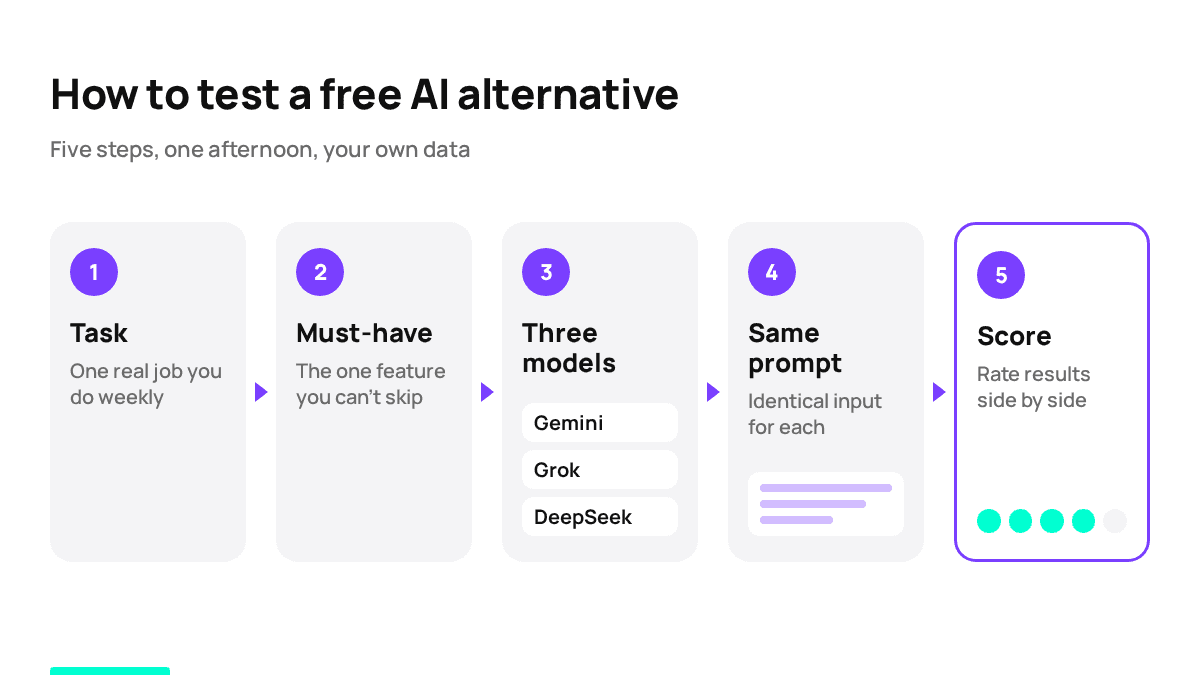
How to choose: match the task to the model in five steps
- Name the task in one line: "summarise a 40-page contract", "fix this Python error", "what's new in EU AI rules this month".
- Find the must-have feature: files mean a chatbot that accepts attachments, fresh facts mean a search assistant, private data means a local model.
- Shortlist three models from different vendors. Two models from one company tend to make similar mistakes.
- Give each the same prompt and the same files. Change nothing between runs.
- Score them with the test below. Pay only if every free option fails it twice.
A five-minute test to run on any chatbot before you commit
- Minute 1. Paste a real task from your work, not a demo question.
- Minute 2. Ask something you already know the answer to, such as a figure from your own report. A wrong answer here tells you more than a fluent answer anywhere else.
- Minute 3. Send a follow-up: "Shorten this to three bullets and keep all the numbers." This checks whether it follows instructions.
- Minute 4. If you work with files, run the last-page check from the Gemini section.
- Minute 5. Score it. Are the facts right? Did it follow the format? Did it admit when it wasn't sure? Would you send the answer after light edits?
Keep the model if it scores four yeses. Drop it if it invents a source or ignores the format twice in a row.
Frequently asked questions
Related articles
 AI explained
What Is an AI Aggregator and When Do You Actually Need One?
How an AI aggregator gives you text, image, video and audio models in one subscription, what it can't do, and a simple test to see if you need one.
What Is a Neural Network in Plain Words and How It Works
A plain-language walkthrough of what a neural network is, how it learns, why it invents facts, and a short experiment you can run on a text model yourself.
AI Photo Editing: What Works, What Fails, How to Prompt It
A practical look at AI photo editing: which tasks models handle well, how to write an editing prompt that protects the rest of the frame, and how to keep token spend low.

Corporate access to AI models
Invoice for legal entities, centralised payment, priority support
- Access to ChatGPT, Gemini, Grok, Claude and DeepSeek
- Prompt library and shared access inside the team