
Seedance AI Alternatives: Video Models to Try Instead in 2026

If Seedance isn't working for a clip, here is the short list. Use Kling 4.0 when you need keyframe or reference control. Use Veo Omni for output up to 4K. Use Hailuo 02 Standard, Kling 2.1 Standard or Grok Imagine Video when cost per run matters most. For text-to-video up to 15 seconds at up to 1080p, there is HappyHorse.
The credit figures below are the cost of one run on Moleculs as of November 2026. All of these models run on one subscription, so you can compare them without opening a new account for each. The baseline is on the Seedance 2.0 model page, and the current price is shown next to each model.
Quick answer: which Seedance alternative fits which job
- You know the first and last frame: Kling 4.0 by keyframes, 171 credits.
- The same character or product appears in every shot: Kling 4.0 by references (171), its Flash version (102) or Kling 3.0 with element references (300).
- You need 4K: Veo Omni (240) or Kling 3.0 in 4K mode (300).
- You want motion from a still, up to 15 seconds at 1080p: Wan 2.6, 140.
- You want the cheapest draft: Hailuo 02 Standard (42), Kling 2.1 Standard (52) or Grok Imagine Video (62).
- You like the Seedance look but not the price: Seedance 2.0 Mini, 100.
What Seedance 2.0 and 2.5 do well, and where people start looking elsewhere
Seedance 2.0 (200 credits) takes text, an image as the first frame, or multimodal references. Seedance 2.5 (284) makes clips up to 30 seconds with sound and follows references closely. No other model in the list states a length past 15 seconds, so for a long take, 2.5 is the one to use.
People switch for four reasons:
- Iteration cost. A scene rarely works on the first run. Four runs of 2.5 cost more than the 1000-credit monthly quota of the Promo plan.
- Control. You want to set the start and end frames yourself, not describe them in words.
- Resolution. The client asks for 4K.
- One scene keeps failing. Every model has weak spots, such as liquids, hands or fast motion. If a few rewrites don't fix it, try another model.
Comparison table: Seedance vs Kling, Veo, Wan, Hailuo, HappyHorse and Grok Imagine
| Model | Input / mode | Max length | Resolution | Credits per run |
|---|---|---|---|---|
| Seedance 2.5 | References, with sound | 30 s | — | 284 |
| Seedance 2.0 | Text, first-frame image, references | — | — | 200 |
| Seedance 2.0 Mini | Text, image, references | — | — | 100 |
| Kling 3.0 | Multi-shot, element references | — | 4K mode | 300 |
| Kling 3.0 (image-to-video) | Photo plus camera motion | — | — | 300 |
| Kling 4.0 (keyframes) | Keyframes | — | — | 171 |
| Kling 4.0 (references) | References | — | — | 171 |
| Kling 4.0 Flash (references) | References | — | — | 102 |
| Kling 2.1 Standard | Image | 5 or 10 s | — | 52 |
| Veo 3.1 | Text, image | — | 1080p option | 500 |
| Veo Omni | Text, image, multimodal | — | Up to 4K | 240 |
| Wan 2.6 | Image | 5, 10 or 15 s | 720p, 1080p | 140 |
| Hailuo 02 Standard | Image | 6 or 10 s | 512p, 768p | 42 |
| HappyHorse Text-to-Video | Text | Up to 15 s | Up to 1080p | 320 |
| HappyHorse Image-to-Video | Image (required) | — | — | 400 |
| Grok Imagine Video | Text | — | — | 62 |
| Grok Imagine (image-to-video) | Image | — | — | 62 |
Kling 3.0 and Kling 4.0: multi-shot video, keyframes and element references
Kling has several separate entries, each with its own price and mode. Kling 3.0 has multi-shot video, element references and a 4K mode. Kling 3.0 (image-to-video) costs the same 300 credits, but it only animates a photo with camera motion.
Kling 4.0 is split by the kind of control you get:
- By keyframes (171). You supply the key frames and the model fills in the motion between them. Use it for a product turn or a before-and-after, where the end state matters.
- By references (171). You supply images of a character or object, and the model keeps them recognizable through the clip.
- Flash by references (102). The same idea at a lower price.
Flash is a separate model from the full version, so treat a Flash result as a check on your references, not a preview of the full run. Then decide whether the full run is worth 69 more credits. For specific scenes, see our Kling vs Seedance comparison.
Veo 3.1 and Veo Omni: when you need 1080p or up to 4K output
Veo 3.1 does text-to-video and image-to-video with a 1080p option. Both modes cost 500 credits. Veo Omni takes text, images and multimodal input, goes up to 4K and costs 240. Omni costs less than half as much as Veo 3.1 and reaches a higher resolution.
You need 4K when the clip goes on a large screen or when you plan to crop and reframe later. For vertical social video, 1080p is usually enough.
Mistakes cost a lot here. One failed Veo 3.1 run uses half of a 1000-credit quota. Get the composition and timing right on a cheap model first, then move the prompt to Veo. Upscaling won't save you credits either: Topaz Video Upscale costs 1000 per run.
Budget and image-to-video picks: Wan 2.6, Hailuo 02 Standard, Grok Imagine Video
- Wan 2.6 (140). Image-to-video, 720p or 1080p, 5, 10 or 15 seconds. Of the models that list 15 seconds at 1080p, it is the cheapest.
- Hailuo 02 Standard (42). Image-to-video, 512p or 768p, 6 or 10 seconds. Good for checking motion and timing, but too low-res for a final cut on a wide screen.
- Grok Imagine Video (62). Text-to-video. A separate image-to-video entry costs the same.
- Kling 2.1 Standard (52). Image-to-video, 5 or 10 seconds.
Three of these need a start frame, so make one with an image model first. Nano Banana costs 8 credits and Seedream v4 costs 10. A still plus a Hailuo run comes to about 50 credits, less than a fifth of one Seedance 2.5 run. For more options, see alternatives to Kling for image-to-video.
Staying in the family: when Seedance 2.0 Mini is the better choice
Seedance 2.0 Mini costs 100 credits, half the price of 2.0, and takes the same inputs: text, image and multimodal references. If your prompts and references already work in Seedance, Mini lets you keep them and run twice as many drafts.
Mini doesn't replace 2.5: the 30-second clips with sound are listed only for 2.5. For a full cost breakdown, see whether Seedance is free or paid.
How to test one prompt across several video models: step by step
- Write the prompt once and don't change it between models. If you edit it for each model, you end up comparing prompts, not models.
Subject: a barista pours latte art into a white ceramic cup
Action: steady pour, milk forms a rosetta, hand moves slowly
Camera: slow push-in at eye level, single shot, no cuts
Light: warm morning sun from a side window
Look: realistic motion, shallow depth of field, natural color
Avoid: on-screen text, extra hands, sudden zoomKeep the "Avoid" line short.
- Make one start frame. Generate the opening still with an image model and use the same file for every image-to-video model. Text-to-video models get only the text.
- Pick three models from different price tiers. For example, Hailuo 02 Standard (42), Seedance 2.0 Mini (100) and Veo Omni (240). With a Nano Banana start frame (8), that's about 390 credits, or roughly 1.4 runs of Seedance 2.5.
- Match the settings. Where a model gives you the choice, use the same length and aspect ratio. You can't fairly compare a 6-second clip with a 15-second one.
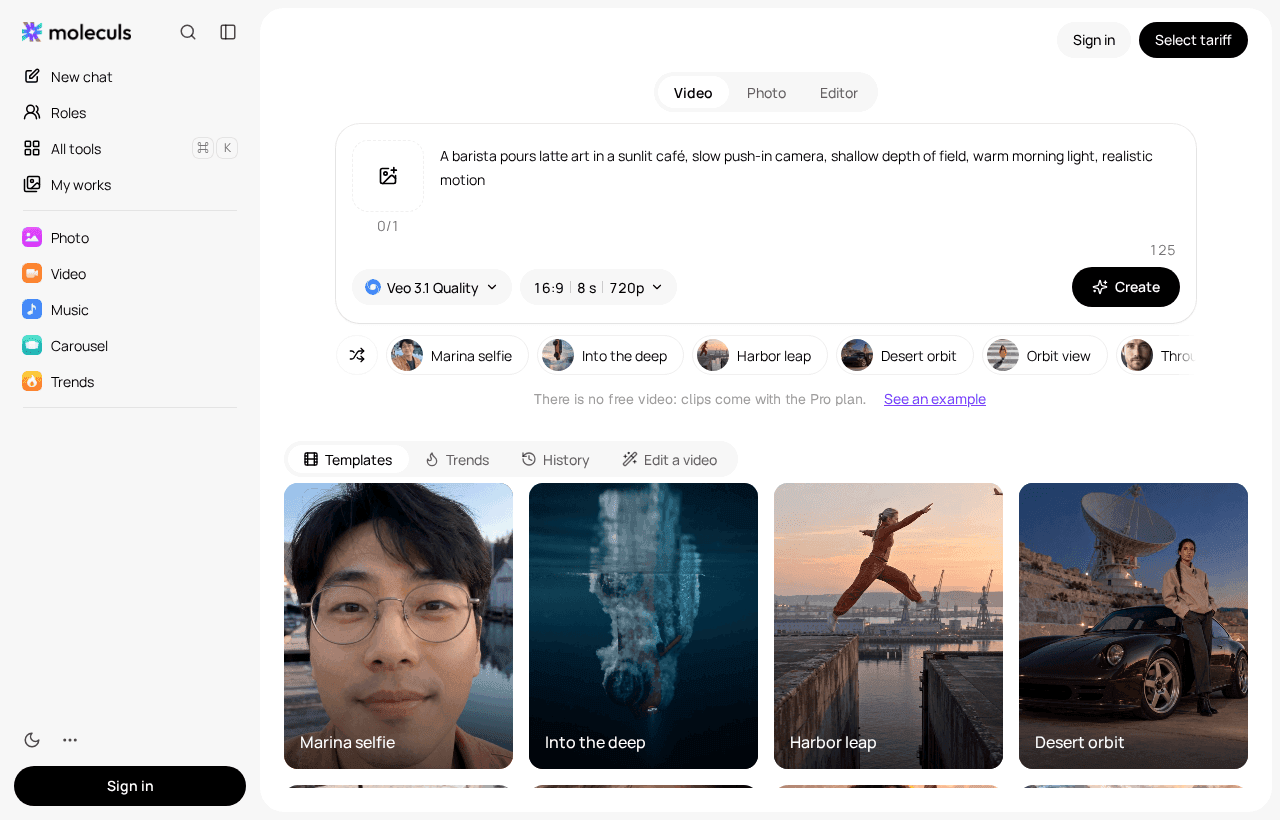
- Run the models one after another. Moleculs doesn't show results from several models side by side. Save each clip under a name like hailuo_42.mp4 so you don't mix them up. You can run the barista prompt as a video, then switch to the next model.
- Score each clip from 0 to 2 on five checks:
- The action happens: the milk pours and a pattern forms.
- The camera does what you asked: a push-in with no cut.
- The physics look right: the liquid flows and the cup keeps its shape.
- Hands stay stable from frame to frame.
- The light stays the same from start to finish.
Keep any clip that scores 8 or more out of 10. If two models tie, take the cheaper one.
- Run the winner a second time before you commit. One run per model doesn't tell you much, and a good first result can be luck.
How to pick: a short checklist by clip length, input type and budget
- Over 15 seconds, or sound in the same run: Seedance 2.5.
- 10 to 15 seconds: Wan 2.6 from a still, HappyHorse Text-to-Video from text.
- Text only: Veo Omni, HappyHorse Text-to-Video, Grok Imagine Video, Seedance 2.0 or Mini.
- You have a still: start with Hailuo 02 Standard or Wan 2.6. The other image-to-video options are in the table.
- Start and end frames fixed: Kling 4.0 by keyframes.
- 4K: Veo Omni or Kling 3.0.
- About 100 credits per run or less: Hailuo 02 Standard, Kling 2.1 Standard, Grok Imagine Video, Seedance 2.0 Mini.
Don't choose a model based on one clip, and don't count on this article's prices staying the same for months. You'll find the current figures in the full model catalogue.
Frequently asked questions
Related articles
 Model guides
Kimi Alternatives: What to Use Instead of Kimi K3 and K2
DeepSeek, Qwen, GLM, Claude, Gemini and GPT compared with Kimi K3 and K2 by input types, credits per run and best use. Pick a swap and test it on your
 Images and video
Kling vs Seedance 2.0 and 2.5: Which AI Video Model to Pick
Kling 3.0, Kling 4.0 and Seedance 2.0, 2.0 Mini and 2.5 compared on clip length, sound, references, multi-shot and cost per run.
Best AI Models for Writing Text: 2026 Comparison
A practical breakdown of text models in 2026: flagships for long-form, light models for short copy, search models for facts, plus a prompt skeleton and a five-step workflow.

Corporate access to AI models
Invoice for legal entities, centralised payment, priority support
- Access to ChatGPT, Gemini, Grok, Claude and DeepSeek
- Prompt library and shared access inside the team